How To Enable Test Purchases For Your Android Apps
Introduction Link to heading
Many developers want to monetize their apps to cover development costs. One common approach is a subscription-based app model. In this article, I am going to show you how to enable test purchases for your Android apps to easily test your subscriptions and digital products.
What you need Link to heading
To get started, you need a working Android app in the internal test track and test users.
To allow test purchases for your test users, go to the Play Console -> Settings -> License testing.
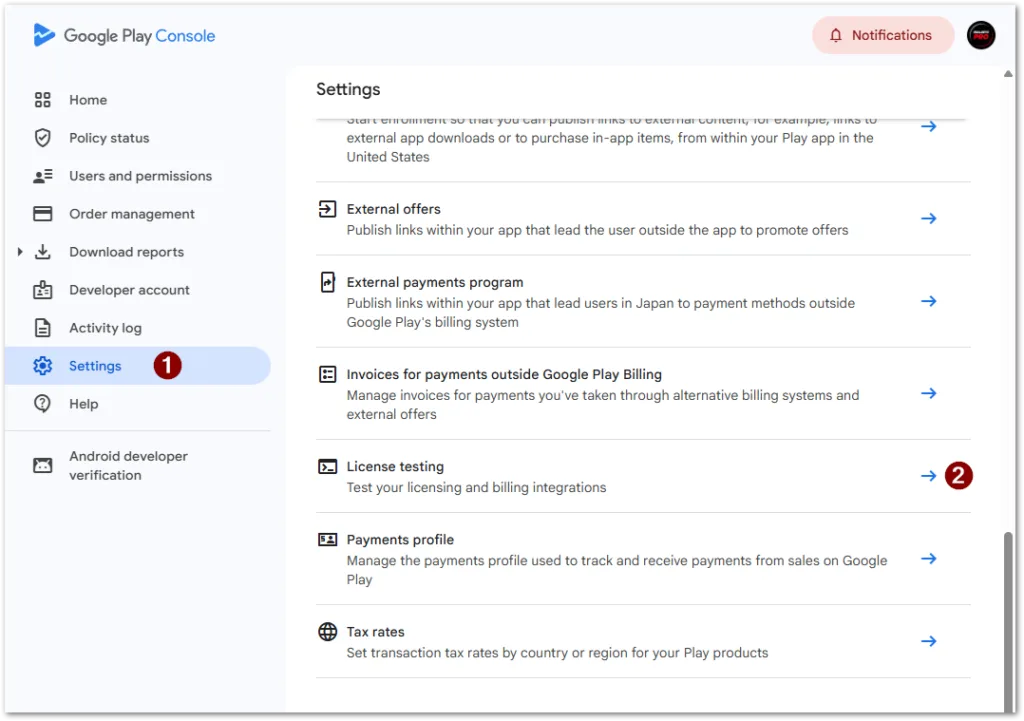
Setting up test purchases for Android Apps in Google Play Console
Choose the email list of the testers, you want to grant access to test purchases. Be aware that this is across all apps the tester has access to!
It might be reasonable to create at least one list of testers per app.
Don’t forget to save the changes. They are effective immediately.
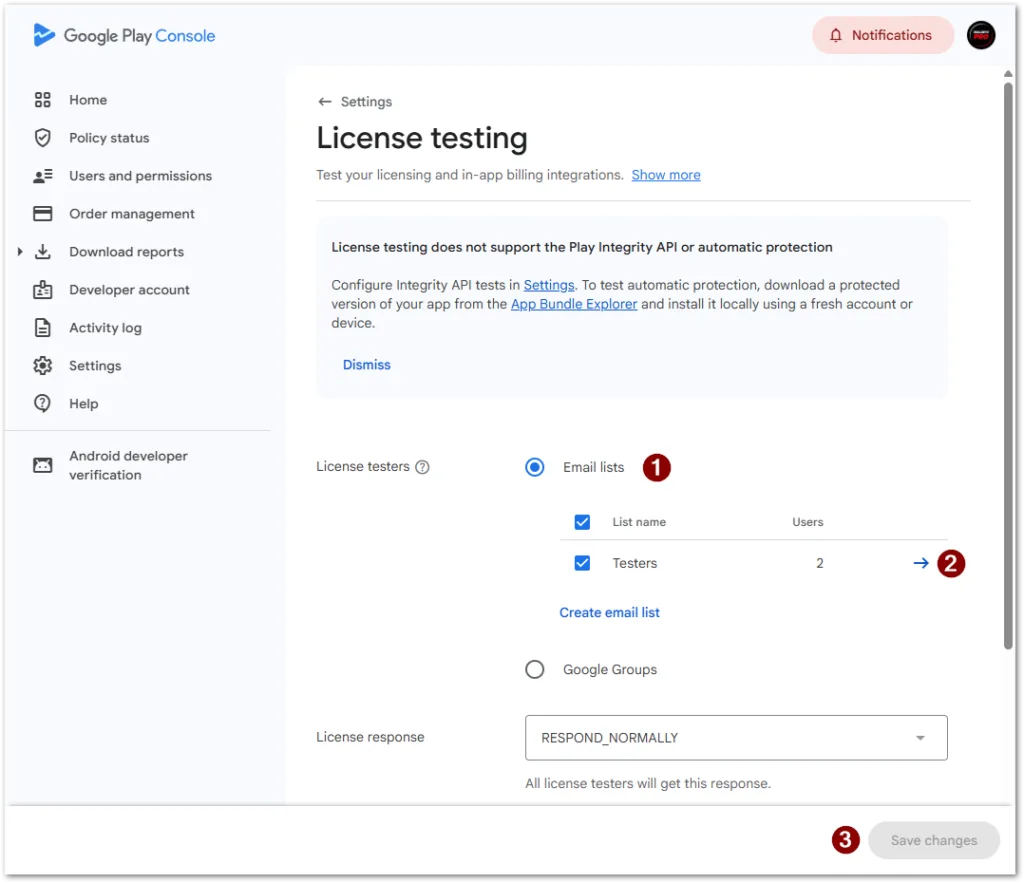
Setting up test purchases for Android Apps in Google Play Console
💡 Tip
Products are permanent while subscriptions auto-renew after a short period of time (a yearly subscription renews every 30 minutes). Users can cancel their subscriptions in their Google Play account.
Why it might not work Link to heading
-
You must have configured a digital product (one time or subscription) for your app.
-
Your APK/App Bundle must be uploaded to Play Store in a production or test track.
-
Your app must have testers or users that are enabled to make test purchases.
-
The app must run on a real device. It doesn’t work in emulators.
Read the official documentation for more details!
Conclusion Link to heading
Setting up and testing digital product and subscriptions is an essential part in monetizing mobile apps. In this article, you learned how to enable test purchase for your Android apps. Publish your test app, configure test users, and enable license testing. That’s it!
Related articles Link to heading

How To Monitor Your Mobile Apps With Firebase Crashlytics Link to heading
Learn why your apps crash and why you get complaints from users. Here is how to monitor your mobile apps with Firebase Crashlytics. Get crash trends, grouped issues, exception types and messages, source code location, stack traces, device types, and much more!

How To Set Up A Free Repository For Your Flutter Packages Link to heading
Here is how to set up a free repository for your Flutter packages with Cloudsmith in no time! Learn how to create an account, set up a repository, upload packages, and consume them in your Flutter apps!
How To Write Unit Tests For A Flutter Application Link to heading
We cover a basic example of how to write unit tests for a Flutter application. Explained code samples are included. Here is how to write unit tests for a Flutter application!