
Introduction
A few days ago, I started noticing that Copilot was a co-author in some of my commits to my GitHub project. Since I write commit messages myself, I had no idea what this was about. The hint in GitHub just tells
Co-authored-by: Copilot <copilot@github.com>
Yes, I am using GitHub Copilot for development. But I haven’t seen any information that it will be mentioned in my commits as co-author. It just appeared one day.
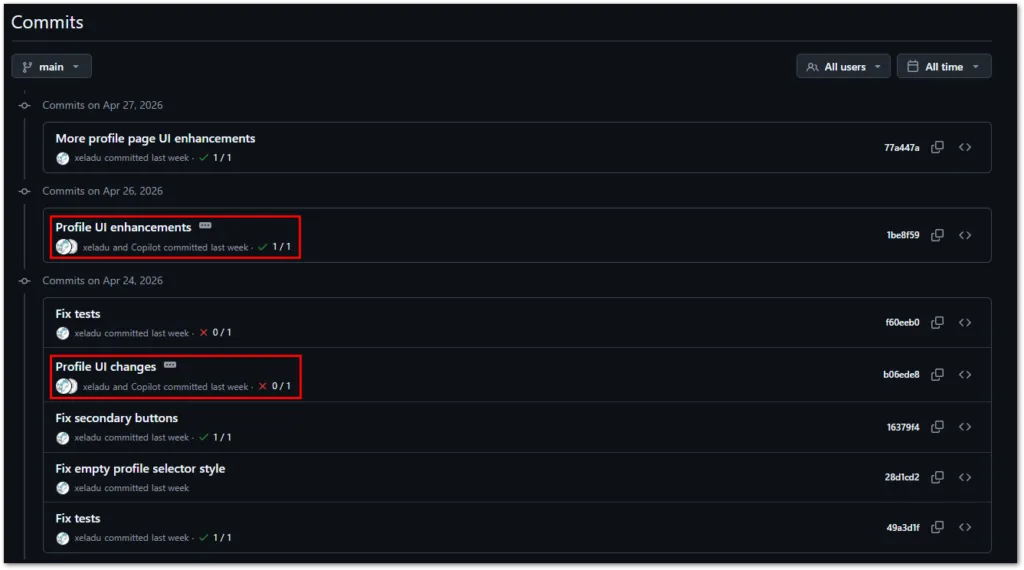
My recent commit history on GitHub with Copilot being added as co-author.
Then, I stumbled across an article explaining the details. It’s a VS Code setting and it was changed recently. When you use VS Code’s internal Git tooling and your commit contains AI edits or a chat session, Copilot will be a co-author in this commit. This does not happen if you use external Git tooling outside of VS Code.
To disable this behavior, go to File > Preferences > Settings, then type git.addAICoAuthor in the search box, and change the setting to off.
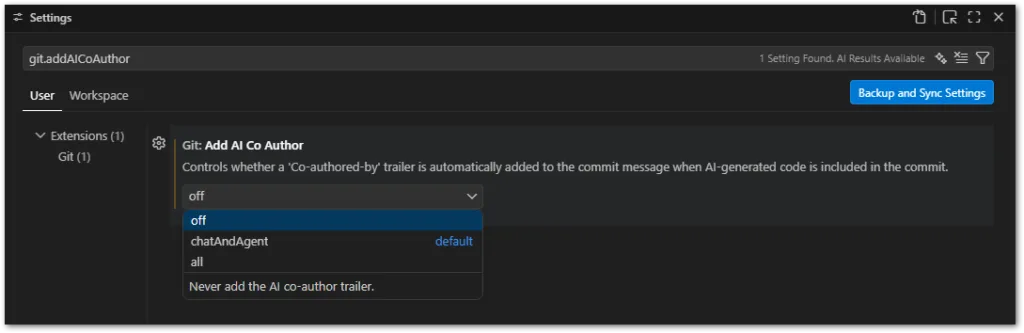
VS Code setting to remove Copilot as co-author in commit messages.
After that, the original behavior is restored and Copilot won’t appear in your commit messages again. However, it won’t affect existing commits.
Conclusion
An annoying move by Microsoft to silently add Copilot as a co-author in your commits when using VS Code. It would have been nice to get a heads up before the change. I would have changed the setting immediately if I had known…