Can’t use your pipeline in Azure DevOps with .NET7? Here is a solution!
After upgrading your app to a newer .NET version the cloud build agent of Azure DevOps fails. Here is what you can do against it! Link to heading
.NET7 was released some days ago. Today, I upgraded one of my apps, pushed it to my Git repository hosted in Azure DevOps, and waited for the build pipeline to finish. But sadly, I received an error message
error NETSDK1045: The current .NET SDK does not support targeting .NET 7.0. Either target .NET 6.0 or lower, or use a version of the .NET SDK that supports .NET 7.0.
The reason is that the Azure VM images used for pipelines are not updated yet. It will take some time before .NET7 will be preinstalled on them.
To fix the issue, you need to use the Use .NET Core task and select 7.x as a version.
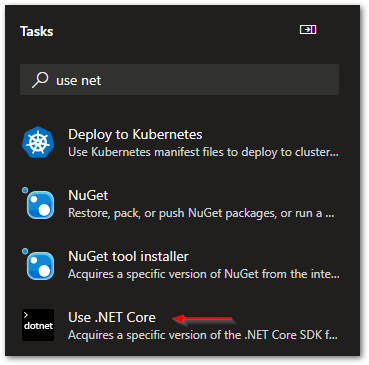
Use .NET Core task to install specific .NET version in Azure Pipelines
Insert the task before your other .NET tasks and your pipeline should work again. It will download and install the most recent .NET7 version to the agent.
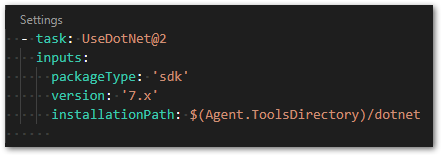
Use .NET Core task in YAML syntax in Azure Pipelines
Your pipeline should work again after that!
For more details have a look at the discussion on GitHub.
Related articles Link to heading

How to create a pipeline from an existing YAML file in Azure DevOps Link to heading
Instead of creating a pipeline with the editor of Azure DevOps, you can create a pipeline from an existing YAML file. Here is how you do it!

I Created an Automated Medium Newsletter - Here is how you can do it! Link to heading
All you need is some coding skills, your Medium RSS feed, a database, and a scheduler to run your code regularly. Here are all the details!
How to replace app config settings with the Replace Tokens extension in Azure DevOps Link to heading
I’ll explain how to use the Replace Tokens extension for Azure DevOps to dynamically change config variables in your app during a pipeline run.