Learn All About The New C# 12 Features!
Here are code examples and explanations so that you can learn all about the new C# 12 features that were published recently. Link to heading
New year, new .NET version. And along with .NET8 comes C# 12 which brings us some fancy new features. Learn all about the new c# 12 features in this article!
How to enable it Link to heading
Upgrade your .NET projects to .NET8 by changing the <TargetFramework> property in your .csproj files to net8.0. Then, you can use all new C# 12 features.
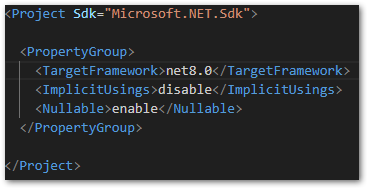
Enable C# 12 by setting the target framework to .NET 8 in a .csproj file
Alias any type Link to heading
They have been part of the language since the beginning and you probably know them. The news is also rather small but you can now use any type instead of only named types when creating aliases. Here are a few examples:
C#
using NewAlias = int;          // referencing the int type instead of System.Int32
using Point = (int x, int y);  // referencing a tuple
using List = [1,2,3];          // referencing an array
This change is nice but irrelevant to me. I don’t use aliases at all. The only reason for me to create an alias would be if there are conflicting imports with identical names. But apart from that, I’d rather use classes or struct instead of aliases.
Optional Lambda expression parameters Link to heading
Optional parameters for methods in C# are known to everyone. But with C# 12, your Lambda function can also have optional parameters and even parameter arrays. Here is how it works:
C#
// Lambda function with default parameter
var addDefault = (int toAdd = 5) => toAdd + 1;
addDefault();  // 6
addDefault(4); // 5
addDefault(0); // 1

// Lambda function with parameter list
var counter = (params int[] numbers) => numbers.length;
counter();      // 0
counter(1,1,1); // 3
counter(1,2,3); // 3

// method group with default parameter
var addDefault = Add;
addDefault();  // 6
addDefault(4); // 5
addDefault(0); // 1

// method group with parameter list
var counter = Count;
counter();      // 0
counter(1,1,1); // 3
counter(1,2,3); // 3

// method with default parameter
int Add(int toAdd = 5) {
  return toAdd + 1;
}

// method with parameter list
int Count(params int[] numbers) {
  return numbers.Length;
}
Once again, this is irrelevant for me. The only possible way for me to use this would be ICommand handlers. Maybe, if you work with callbacks a lot, this could be something for you. Apart from that, I am not sure how this could be useful.
Collection expressions Link to heading
Creating collections with C# 12 got a lot easier than before. Instead of using a different syntax for different collection types, there is now a unified syntax that works with all collections. Again, here is some code:
C#
// collections with C# 11
int[] x1 = new int[] { 1, 2, 3, 4 };
int[] x2 = Array.Empty<int>();
WriteByteArray(new[] { (byte)1, (byte)2, (byte)3 });
List<int> x4 = new() { 1, 2, 3, 4 };
Span<DateTime> dates = stackalloc DateTime[] { GetDate(0), GetDate(1) };
WriteByteSpan(stackalloc[] { (byte)1, (byte)2, (byte)3 });

// collections with C# 12
int[] x1 = [1, 2, 3, 4];
int[] x2 = [];
WriteByteArray([1, 2, 3]);
List<int> x4 = [1, 2, 3, 4];
Span<DateTime> dates = [GetDate(0), GetDate(1)];
WriteByteSpan([1, 2, 3]);

// you can also combine lists with the spread (..) operator
List<int> x5 = [1, .. x4, 2, .. x2, 3, .. x1];
That is a great enhancement in my opinion. I especially love the spread (..) operator because I already know it from other languages. An easier and more unified syntax is always appreciated.
Ref readonly parameters Link to heading
ref readonly parameters close a gap between in and ref parameters. There are some tricky edge cases that cannot be solved properly with in or ref and that’s where the new parameter comes into play. There is a great explanation of such a case on StackOverflow. Feel free to read it for details.
While I can live with in and out parameters, ref has always been something that I tried to avoid if possible. ref readonly is only for very specific use cases and the majority of developers won’t ever use it.
Inline arrays Link to heading
Inline arrays are a way to squeeze some extra performance out of your .NET app and make it as fast as possible. It’s an array with a fixed size in a struct type. The compiler can make use of the known information and optimize it to the max. If you work with [System.Span<T>](https://learn.microsoft.com/en-us/dotnet/api/system.span-1?view=net-8.0) or System.ReadOnlySpan<T>, you are already using inline arrays in C# 12.
Here is a code example of how to declare an inline array:
C#
[System.Runtime.CompilerServices.InlineArray(10)]
public struct Buffer
{
    private int _element0;
}
Working with inline arrays is not different from working with a normal array. Here is how you use it:
C#
var buffer = new Buffer();
for (int i = 0; i < 10; i++)
{
    buffer[i] = i;
}

foreach (var i in buffer)
{
    Console.WriteLine(i);
}
Nice if you need some extra speed boost in your app!
Primary constructors Link to heading
Primary constructors were introduced on records before, but can now also be used on classes and structs. It reduces the boilerplate code and gives us an easier option to initialize member fields or properties.
Here is a comparison between C# 11 with standard constructors and C# 12 with primary constructors:
C#
// C# 12
public class BankAccount(string accountID, string owner)
{
    public string AccountID { get; } = accountID;
    public string Owner { get; } = owner;

    public override string ToString() => $"Account ID: {AccountID}, Owner: {Owner}";
}

// C# 11
public class BankAccount
{
    public string AccountID { get; }
    public string Owner { get; }

    public BankAccount(string accountID, string owner)
    {
        AccountID = accountID;
        Owner = owner;
    }

    public override string ToString() => $"Account ID: {AccountID}, Owner: {Owner}";
}
You can also get the same behavior as the code example above by using the required and init keywords. With that approach, you can get rid of the constructor entirely if there is no call to a base class involved.
C#
public class BankAccount
{
    public required string AccountID { get; init; }
    public required string Owner { get; init; }

    public override string ToString() => $"Account ID: {AccountID}, Owner: {Owner}";
}
I like this new feature. It gives us a new option to initialize properties and fields in classes. There should now be a matching style for every type of developer available in C#.
Here is the official blog post of Microsoft about the announcement of C# 12.

Announcing C# 12 - .NET Blog Link to heading
Announcing the official release of C# 12, including collection expressions, primary constructors, and more!
Conclusion Link to heading
In this article, you could learn all about the new C# 12 features. Microsoft put a lot of effort into improving the language, adapting to new trends, and simplifying existing concepts. Overall, C# is in a good state, but you can also see that big new changes are not on the agenda.
Related articles Link to heading

I tried the new C# 11 features - Here are my useful takeaways Link to heading
.NET Conf 2022 is over and Microsoft released .NET 7 together with C# 11. Here are the new features and my opinion of them.
How You Can Enhance Your Code Quality With NDepend Link to heading
Here is how you can enhance your code quality with NDepend, have fewer bugs, and deliver better software products.

Can’t use your pipeline in Azure DevOps with .NET7? Here is a solution! Link to heading
After upgrading your app to a newer .NET version the cloud build agent of Azure DevOps fails. Here is what you can do against it!